How Catalyst SD-WAN router shares events with Security Cloud Control Firewall Management
This process describes how Catalyst SD-WAN shares security events with Security Cloud Control Firewall Management in Security Cloud Control. This integration streamlines event visibility and analysis, empowering SOC analysts to monitor network activity and enhance threat detection using Catalyst SD-WAN security data in real time.
Summary
The key components involved in the event sharing process are:
-
Catalyst SD-WAN device: Generates event logs for network traffic and exports data to PSV files
-
Catalyst SD-WAN Manager: Receives event data from SD-WAN devices and forwards to analytics cloud
-
SD-WAN Analytics cloud: Stores event data and notifies Security Services Exchange
-
Security Services Exchange: Downloads event data and converts from PSV to JSON format
-
Security Analytics and Logging (SaaS): Processes, classifies, and enriches event data for SOC analysts
Workflow
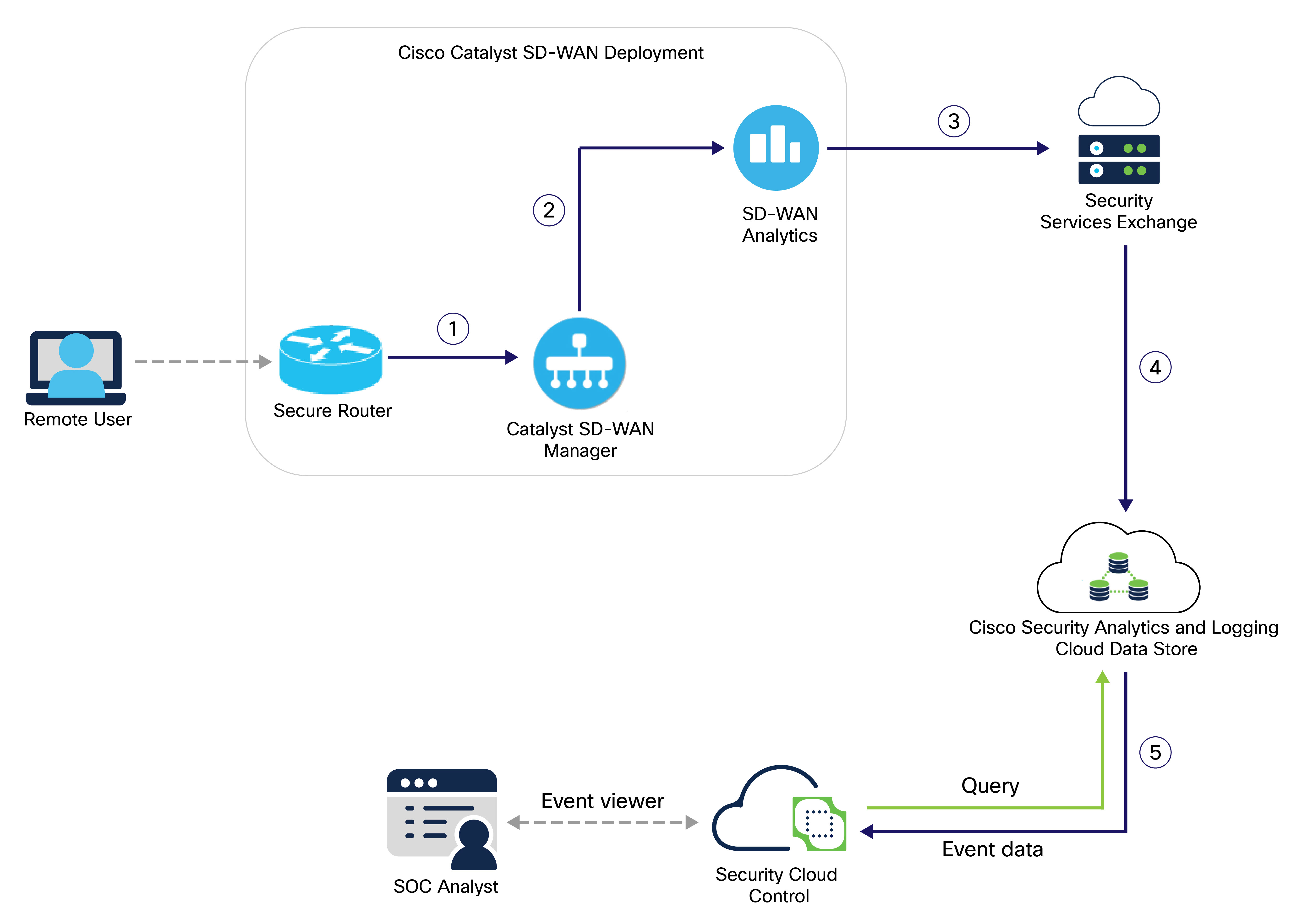
These stages describe how security events flow from Catalyst SD-WAN to Security Cloud Control:
- A remote user accesses the network, and the Catalyst SD-WAN device generates an event log for the corresponding traffic. The device then exports the event data to a PSV file and sends it to Catalyst SD-WAN Manager.
- Catalyst SD-WAN Manager sends the event data to the SD-WAN Analytics cloud.
- SD-WAN Analytics stores the event data in cloud to make it accessible for Security Services Exchange and notifies Security Services Exchange. After receiving the notification from SD-WAN Analytics cloud, Security Services Exchange downloads the event data from SD-WAN AWS cloud.
- Security Services Exchange converts the event data from PSV to JSON format and sends it to Cisco Security Analytics and Logging (SaaS).
- Security Analytics and Logging (SaaS) processes the event data using various services to classify and enrich it for use by Security Cloud Control. Security Analytics and Logging (SaaS) stores the event data in the cloud data store. The event viewer queries this data store to provide security operations center (SOC) analysts with relevant event data.