Schedule polling for device changes
Optimize Security Cloud Control by customizing schedule polling for device changes. This overrides the tenant default, ensuring precise monitoring of device configuration changes across your network for efficient, automated device management and synchronization.
If you enable Conflict detection or Enable the option to auto-accept device changes from the Settings page, Security Cloud Control polls the device at the default interval to check for configuration changes made outside Security Cloud Control. You can set how often Security Cloud Control polls for changes for each device. This customization can be applied to multiple devices.
If you do not configure a selection for a device, the interval is automatically configured for "tenant default".
Note | If you set a custom interval per device on the Security Devices page, it overrides the polling interval selected as the Default Conflict Detection Interval on the General Settings page. |
After you enable Conflict Detection from the Security Devices page or Enable the option to auto-accept device changes from the Settings page, you can schedule how often Security Cloud Control polls your devices with this procedure.
Procedure
Step 1 | Choose . |
Step 2 | Click the Devices tab to locate your device. |
Step 3 | Click the appropriate device type tab. |
Step 4 | Select the devices where you want to enable conflict detection. |
Step 5 | Next to Conflict Detection, click the drop-down menu for Check every and select the polling interval you want. 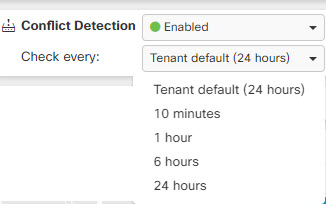
|
The selected devices are now configured with the custom polling interval for conflict detection, overriding the tenant default settings.