How policies examine traffic for intrusions
When the system analyzes traffic as part of your access control deployment, the network analysis (decoding and preprocessing) phase occurs before and separately from the intrusion prevention (intrusion rules and advanced settings) phase.
Summary
The key components involved in examining traffic for intrusions are:
-
Security Intelligence: Performs initial traffic filtering and blocking
-
SSL policy: Handles encrypted traffic inspection and decryption
-
Network analysis policies: Conduct decoding and preprocessing of traffic
-
Access control rules: Determine which policies to apply to traffic
-
Intrusion policies: Examine traffic for security threats and intrusions
-
File policies: Analyze files for malware and threats
-
Network discovery policy: Passively inspects packets for network mapping
Workflow
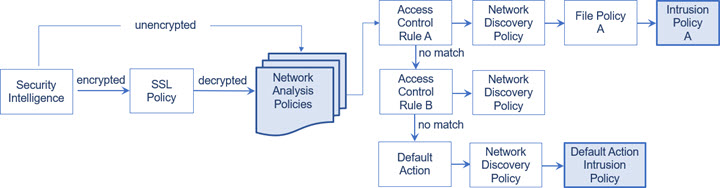
These stages describe how the system examines traffic for intrusions in an inline deployment:
- The system processes traffic through multiple policy layers in a specific order, with network analysis and intrusion policy selection phases highlighted in the deployment. In an inline deployment (that is, where relevant configurations are deployed to devices using routed, switched, or transparent interfaces, or inline interface pairs), the system can block traffic without further inspection at almost any step in the illustrated process. Security Intelligence, the SSL policy, network analysis policies, file policies, and intrusion policies can all either drop or modify traffic. Only the network discovery policy, which passively inspects packets, cannot affect the flow of traffic.
-
At each step of the process, a packet could cause the system to generate an event. Intrusion and preprocessor events (sometimes referred to collectively as intrusion events) are indications that a packet or its contents may represent a security risk.
Tip
The diagram does not reflect that access control rules handle encrypted traffic when your SSL inspection configuration allows it to pass, or if you do not configure SSL inspection. By default, the system disables intrusion and file inspection of encrypted payloads. This helps reduce false positives and improve performance when an encrypted connection matches an access control rule that has intrusion and file inspection configured.
- Note that for a single connection, although the system selects a network analysis policy before an access control rule as shown in the diagram, some preprocessing (notably application layer preprocessing) occurs after access control rule selection. This does not affect how you configure preprocessing in custom network analysis policies.