Cisco Identity Services Engine (Cisco ISE) quick configuration results
This reference provides information about the different results that can occur during Cisco Identity Services Engine (Cisco ISE) quick configuration integration with the firewall, including certificate trust prompts and authentication outcomes.
Initial information page for an untrusted certificate
When you enter required information in the Quick Configuration (New) tab page, the system first checks to see if the certificate was signed by a trusted authority. If not, a page similar to this is displayed.
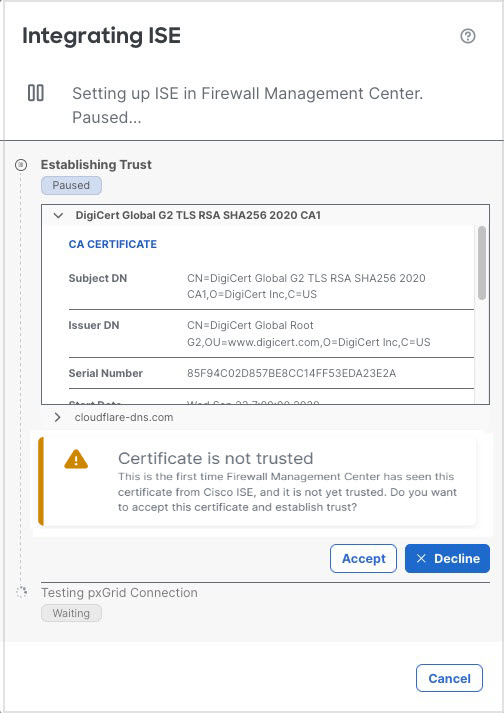
You have these options:
-
Click Accept for the > to trust the certificate and continue authenticating with ISE.
-
Click Decline to quit without authenticating with ISE.
You can then verify the ISE configuration on the Quick Configuration (New) tab page and try again.
Successful ISE integration
If the Cloud-Delivered Firewall Management Center was able to authenticate successfully with the information you provided, a page similar to this is displayed.
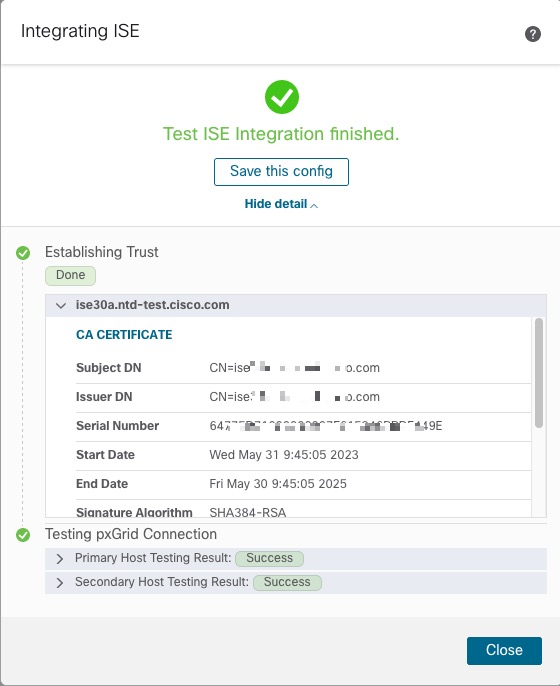
Click Save this Config to save it and be able to use the identity source in the future.
Optionally expand one of the lists under Testing pxGrid Connection to display certificates downloaded from those sources.
Unsuccessful ISE integration
If the Cloud-Delivered Firewall Management Center fails to authenticate with ISE for any reason, a page similar to this is displayed.
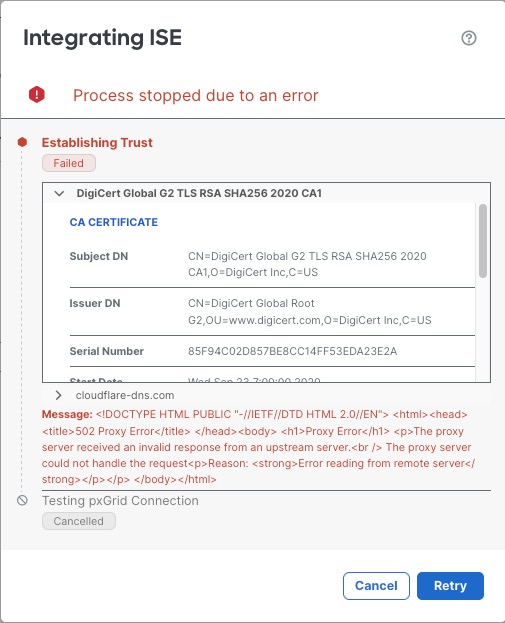
The error messages are displayed in red text.
You have these options:
-
If the error is temporary (for example, a temporarily network issue), click Retry.
-
To try again with different ISE credentials, click Cancel.