Delete the pxGrid Cloud identity source
Delete the pxGrid Cloud identity source from Security Cloud Control when you no longer need it.
This task explains how to delete the pxGrid Cloud identity source from Security Cloud Control, which is necessary if you do not want to use it again.
Before you begin
Deactivate the FMC app instance from the Catalyst Cloud Portal as discussed in Deactivate the pxGrid Cloud app instance.
Follow these steps to delete the pxGrid Cloud identity source:
Procedure
Step 1 | Log in to Security Cloud Control as a user with the Super Admin role. Click . |
Step 2 | Click Identity Services Engine (pxGrid Cloud). |
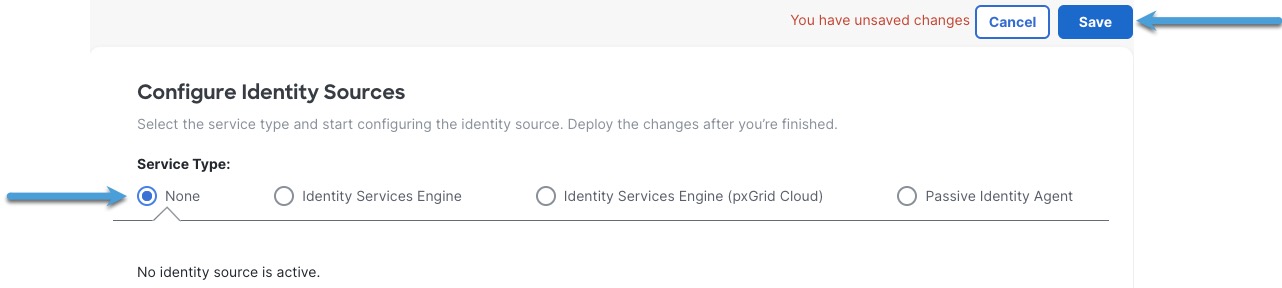
Step 3 | For Service Type, click None. Example:
|
Step 4 | Click Save. |
Step 5 | Confirm your choice when prompted. |
Step 6 | Click Identity Services Engine (pxGrid Cloud). |
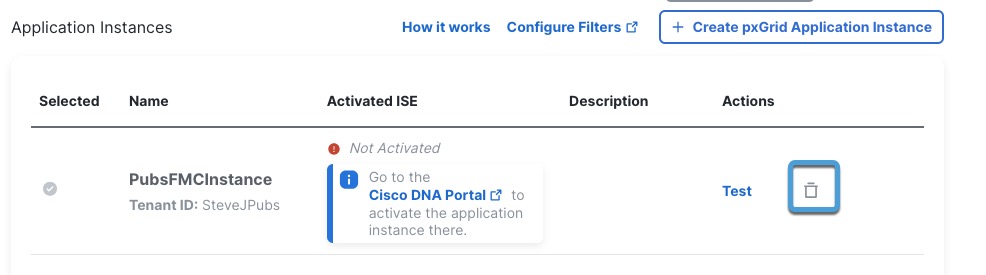
Step 7 | Click Delete ( Example:
|
Step 8 | Confirm the action when prompted. |