Add security zones (outbound decryption)
Add security zones to an outbound standard decryption policy to specify Firewall Threat Defense device interfaces that send traffic to the external server.
A security zone specifies a Firewall Threat Defense device interface that sends traffic to the external server. You can configure source zones, destination zones, or both to control which traffic gets decrypted.
Before you begin
Complete the tasks discussed in Create a rule-based decryption policy with outbound connection protection.
Follow these steps to add security zones to an outbound decryption policy:
Procedure
Step 1 | Click Edit zones next to Security Zones. | ||
Step 2 | In the Security Zones dialog box, do any of the following:
| ||
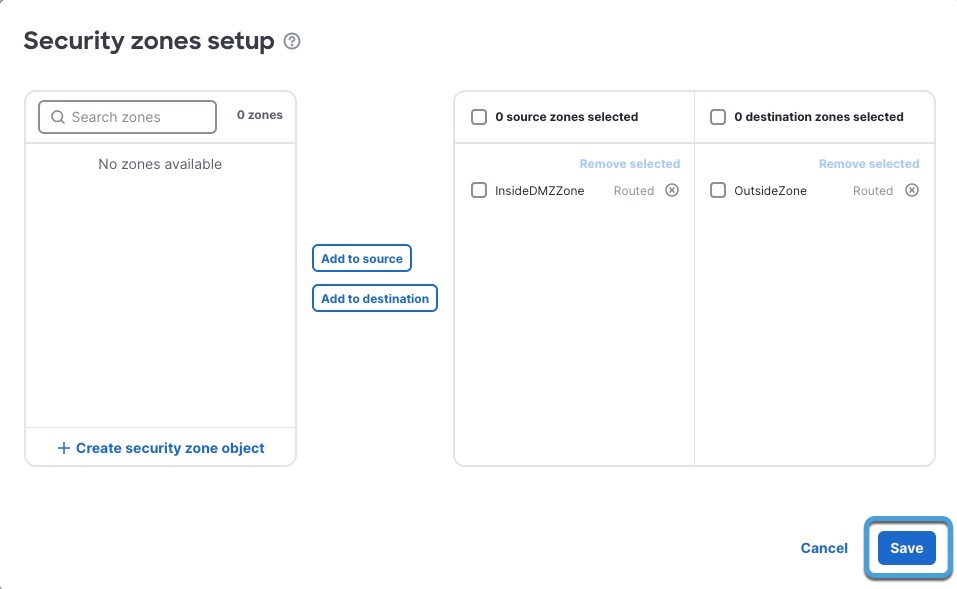
Step 3 | Click Add to Source to decrypt traffic that matches the source network or click Add to Destination to decrypt traffic that matches the destination network. If you select both source and destination networks, to be decrypted, traffic must match both security zones. Typically, the server for which you're decrypting traffic should be in the destination zone. The following figure shows an example.
| ||
Step 4 | Click Save. | ||
Step 5 | If you're finished configuring your policy, see Decryption policy actions. |