Configure Identity Intelligence
This task enables integration between the dynamic firewall and Identity Intelligence.
This task discusses how you associate an identity source with Identity Intelligence, which provides user and device risk ratings to the Security Cloud Control.
Before you begin
Complete the tasks discussed in Associate an identity source with Identity Intelligence.
Procedure
Step 1 | Complete the tasks discussed in Associate an identity source with Identity Intelligence. |
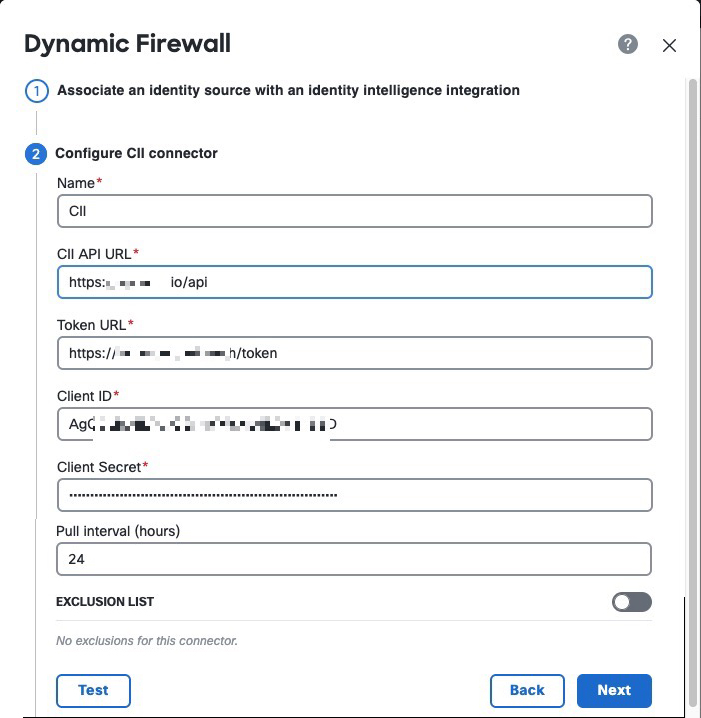
Step 2 | If you selected the Cisco Identity Intelligence check box, enter the information you found for Identity Intelligence as described in Get required information for Identity Intelligence. The following figure shows an example.
|
Step 3 | (Optional.) For Identity Intelligence to consider a specific set of users as trusted, slide Exclusion List to Slider enabled ( Enter one user name per line in username@domain.com format. Users in this list are considered trusted by Identity Intelligence. |
Step 4 | Click Test. Only if the test succeeds, continue with the next step. If any errors are displayed, check all of your Identity Intelligence values and try again. |
Step 5 | Click Next. |
Step 6 | Continue with View system-defined filters. |