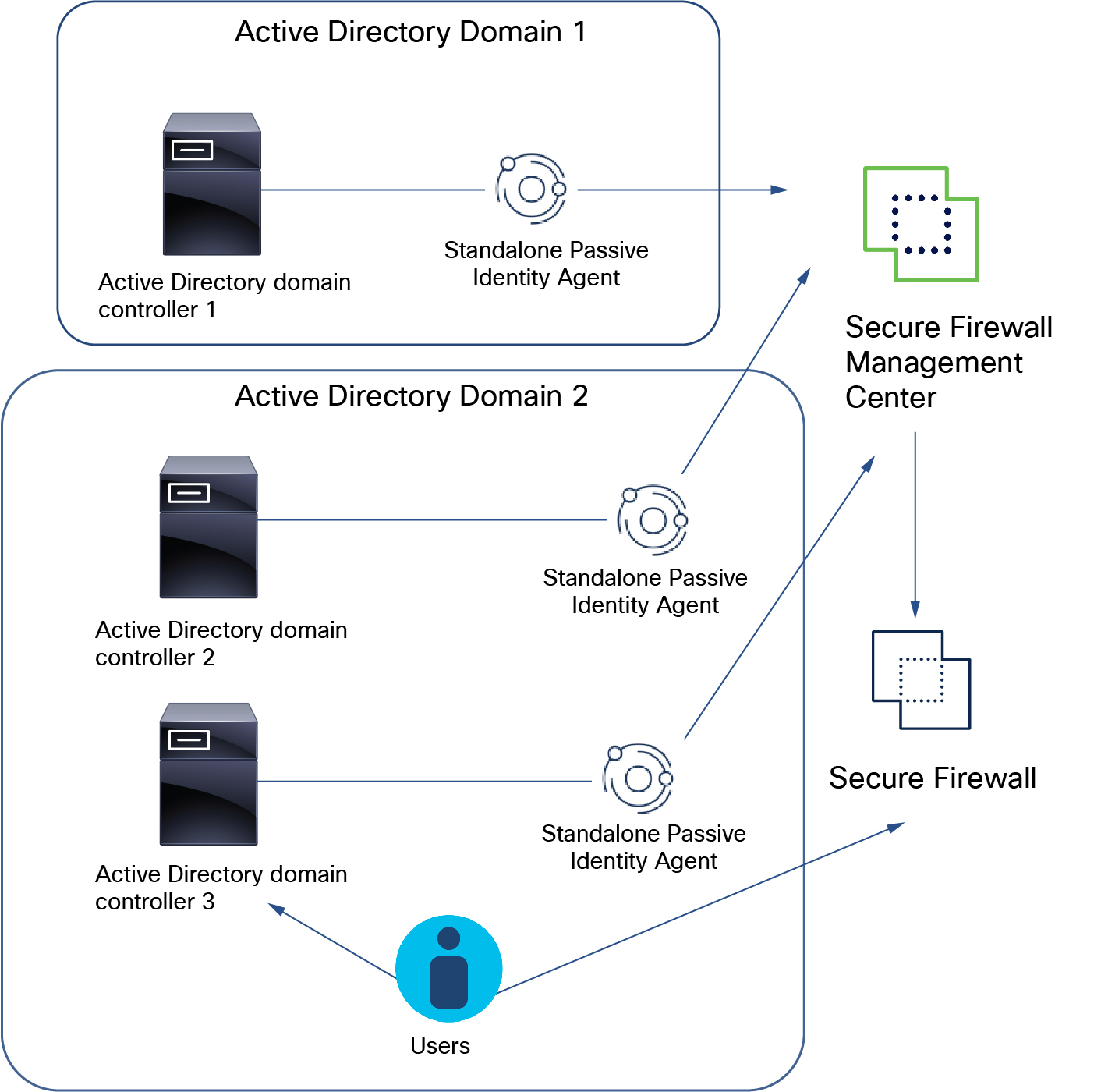
Multiple passive identity agents monitoring multiple domain controllers
This figure illustrates how standalone agents monitor multiple AD domain controllers.
-
In AD domain 1, a standalone passive identity agent installed on a machine attached to AD domain controller 1 sends user and IP address mapping data to the .
-
In AD domain 2, standalone agents installed on domain controllers 1 and 2 send user and IP address mapping data to the .
You can install a passive identity agent on an AD domain controller, a directory server, or on any client connected to the domain you want to monitor.
Deployment steps
The preceding figure shows three passive identity agents, each configured as a standalone. To do this:
-
Create two Microsoft AD realms: one for each AD domain.
See Create an LDAP realm or an Active Directory realm and realm directory.
-
For AD domain 2, create two directories, one for each domain controller.
-
Install the Passive Identity Agent software on a client that can log in to the domain.
Configure each passive identity agent individually to communicate with the on which you configure the passive identity agent source.
-
Create the passive identity agent identity source.
See Create a primary or secondary passive identity agent identity source.