Create Dynamic Objects with Cisco Defense Orchestrator
The following page is displayed if you indicated you're configuring the Cisco Secure Dynamic Attributes Connector provided with Cisco Defense Orchestrator.
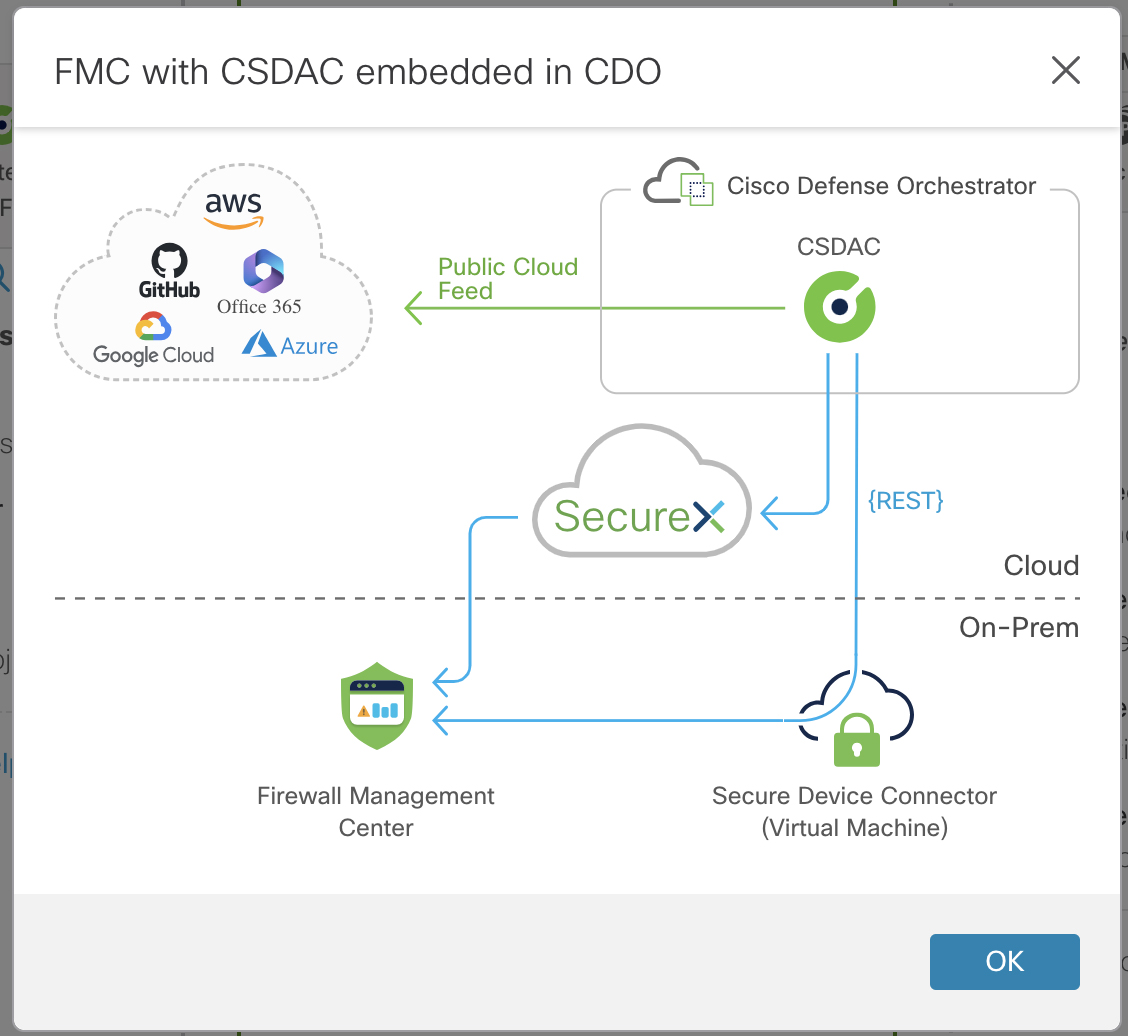
The preceding diagram has details about configuring Cisco Defense Orchestrator that are not discussed in this guide. For more detailed information, see Secure Device Connector (SDC) or SecureX and CDO.
To use this type of deployment:
-
Configure connectors, which retrieve IP addresses from cloud services.
For more information, see Create a Connector.
-
Configure dynamic attributes filters, which determine what IP addresses to send to the management center.
For more information, see Create Dynamic Attributes Filters.
-
Configure adapters, which send IP addresses to a Secure Firewall Management Center or cloud-delivered Firewall Management Center.
For more information, see the section on creating adapters in the Managing Firewall Threat Defense with Cloud-Delivered Firewall Management Center in Cisco Defense Orchestrator.
-
Log in to the Secure Firewall Management Center you defined as an adapter.
If the Secure Firewall Management Center is managed by Cisco Defense Orchestrator, click and choose Cloud-Delivered FMC.
-
View your dynamic objects at .
-
Use dynamic objects in access control rules (, then click the Dynamic Attributes tab).
You do not have to deploy access control rules with dynamic objects; they are updated on all targeted devices automatically.