Create A decryption policy with a Decrypt-Resign rule
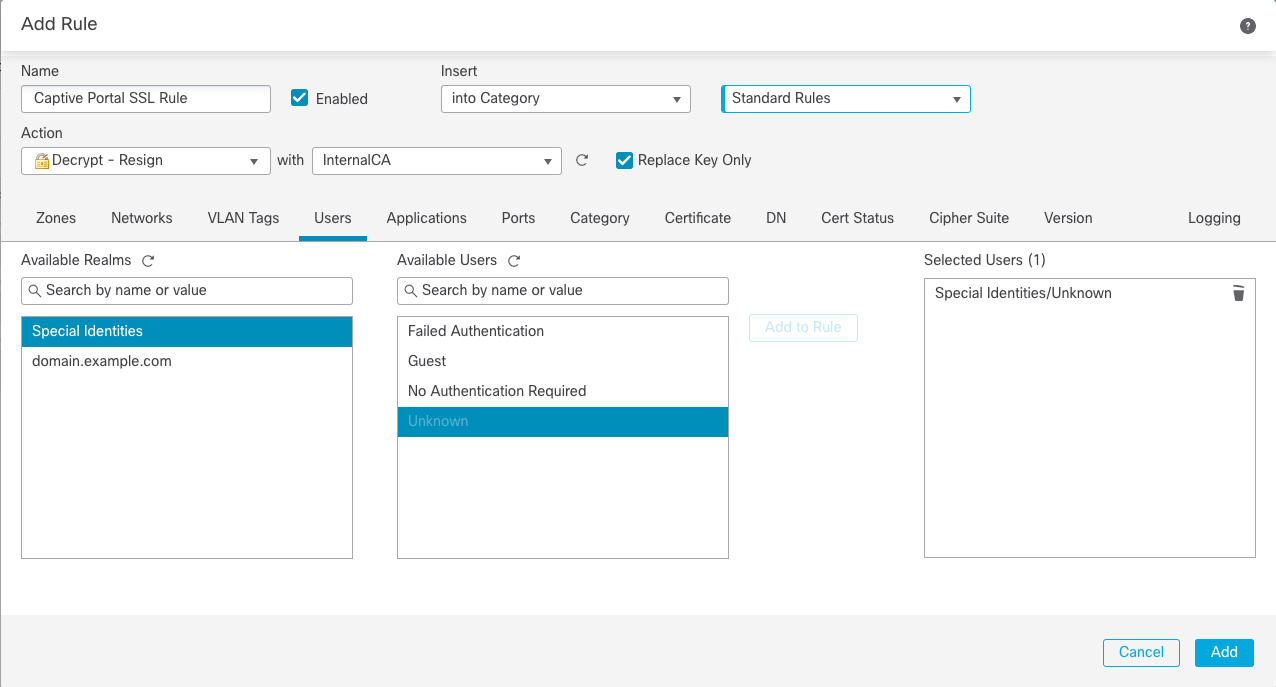
Create a decryption policy to decrypt and resign traffic before the traffic reaches the captive portal.
This part of the procedure discusses how to create a decryption policy to decrypt and resign traffic before the traffic reaches the captive portal. The captive portal can authenticate traffic only after it has been decrypted.
Before you begin
For an overview of the entire captive portal configuration, see Configure the captive portal for user control.
Follow these steps to create A decryption policy with a Decrypt-Resign rule:
Procedure
Step 1 | If you haven't done so already, log in to the Firewall Management Center and create a certificate object to decrypt TLS/SSL traffic as discussed in PKI objects. |
Step 2 | Click . |
Step 3 | Click New Policy. |
Step 4 | Enter a Name and choose a Default Action for the policy. Default actions are discussed in Rule-based decryption policy default actions. |
Step 5 | Click Save. |
Step 6 | Click Add Rule.
|
Step 7 | (Optional.) Set other options as discussed in Rule-based decryption rule conditions. |
Step 8 | Click Add. |
Step 9 | At the top of the page, click Save. |

What to do next
Associate the identity and decryption policies with the access control policy from step 3.
This final step enables the system to authenticate users with the captive portal.
For more information, see Associate Identity and decryption policies with the access control policy.