Prerequisites for using ACME certificates
Review these prerequisites for configuring a remote access VPN policy.
General prerequisites
-
The Firewall Threat Defense device is Version 10.0 or later.
-
Configure DNS in the Firewall Threat Defense platform settings to resolve the domain name of the ACME server.
-
Ensure your domain maps to a public IP address. Configure the device interface with this IP address, and set it as the authentication interface in the ACME certificate enrollment.
-
Configure the same NTP server for the ACME server and the Firewall Threat Defense device.
-
Ensure that you enroll an ACME CA certificate (manually installed CA-only certificate) on the device to authenticate the ACME server.
NoteThe ACME enrollment will fail if you do not enroll this ACME CA certificate first and add it to the device before configuring any ACME certificate.
For example, if you use Let's Encrypt as the ACME server, you must:
-
Get the Internet Security Research Group (ISRG) root certificate from https://letsencrypt.org/certificates/. You can use the root certificate from https://letsencrypt.org/certs/isrgrootx1.pem.txt.
Sample manual CA certificate for the ACME server from https://letsencrypt.org/certs/isrgrootx1.pem.txt:
-----BEGIN CERTIFICATE----- MIIFazCCA1OgAwIBAgIRAIIQz7DSQONZRGPgu2OCiwAwDQYJKoZIhvcNAQELBQAw TzELMAkGA1UEBhMCVVMxKTAnBgNVBAoTIEludGVybmV0IFNlY3VyaXR5IFJlc2Vh cmNoIEdyb3VwMRUwEwYDVQQDEwxJU1JHIFJvb3QgWDEwHhcNMTUwNjA0MTEwNDM4 WhcNMzUwNjA0MTEwNDM4WjBPMQswCQYDVQQGEwJVUzEpMCcGA1UEChMgSW50ZXJu ZXQgU2VjdXJpdHkgUmVzZWFyY2ggR3JvdXAxFTATBgNVBAMTDElTUkcgUm9vdCBY MTCCAiIwDQYJKoZIhvcNAQEBBQADggIPADCCAgoCggIBAK3oJHP0FDfzm54rVygc h77ct984kIxuPOZXoHj3dcKi/vVqbvYATyjb3miGbESTtrFj/RQSa78f0uoxmyF+ 0TM8ukj13Xnfs7j/EvEhmkvBioZxaUpmZmyPfjxwv60pIgbz5MDmgK7iS4+3mX6U A5/TR5d8mUgjU+g4rk8Kb4Mu0UlXjIB0ttov0DiNewNwIRt18jA8+o+u3dpjq+sW T8KOEUt+zwvo/7V3LvSye0rgTBIlDHCNAymg4VMk7BPZ7hm/ELNKjD+Jo2FR3qyH B5T0Y3HsLuJvW5iB4YlcNHlsdu87kGJ55tukmi8mxdAQ4Q7e2RCOFvu396j3x+UC B5iPNgiV5+I3lg02dZ77DnKxHZu8A/lJBdiB3QW0KtZB6awBdpUKD9jf1b0SHzUv KBds0pjBqAlkd25HN7rOrFleaJ1/ctaJxQZBKT5ZPt0m9STJEadao0xAH0ahmbWn OlFuhjuefXKnEgV4We0+UXgVCwOPjdAvBbI+e0ocS3MFEvzG6uBQE3xDk3SzynTn jh8BCNAw1FtxNrQHusEwMFxIt4I7mKZ9YIqioymCzLq9gwQbooMDQaHWBfEbwrbw qHyGO0aoSCqI3Haadr8faqU9GY/rOPNk3sgrDQoo//fb4hVC1CLQJ13hef4Y53CI rU7m2Ys6xt0nUW7/vGT1M0NPAgMBAAGjQjBAMA4GA1UdDwEB/wQEAwIBBjAPBgNV HRMBAf8EBTADAQH/MB0GA1UdDgQWBBR5tFnme7bl5AFzgAiIyBpY9umbbjANBgkq hkiG9w0BAQsFAAOCAgEAVR9YqbyyqFDQDLHYGmkgJykIrGF1XIpu+ILlaS/V9lZL ubhzEFnTIZd+50xx+7LSYK05qAvqFyFWhfFQDlnrzuBZ6brJFe+GnY+EgPbk6ZGQ 3BebYhtF8GaV0nxvwuo77x/Py9auJ/GpsMiu/X1+mvoiBOv/2X/qkSsisRcOj/KK NFtY2PwByVS5uCbMiogziUwthDyC3+6WVwW6LLv3xLfHTjuCvjHIInNzktHCgKQ5 ORAzI4JMPJ+GslWYHb4phowim57iaztXOoJwTdwJx4nLCgdNbOhdjsnvzqvHu7Ur TkXWStAmzOVyyghqpZXjFaH3pO3JLF+l+/+sKAIuvtd7u+Nxe5AW0wdeRlN8NwdC jNPElpzVmbUq4JUagEiuTDkHzsxHpFKVK7q4+63SM1N95R1NbdWhscdCb+ZAJzVc oyi3B43njTOQ5yOf+1CceWxG1bQVs5ZufpsMljq4Ui0/1lvh+wjChP4kqKOJ2qxq 4RgqsahDYVvTH9w7jXbyLeiNdd8XM2w9U/t7y0Ff/9yi0GE44Za4rF2LN9d11TPA mRGunUHBcnWEvgJBQl9nJEiU0Zsnvgc/ubhPgXRR4Xq37Z0j4r7g1SgEEzwxA57d emyPxgcYxn/eR44/KJ4EBs+lVDR3veyJm+kXQ99b21/+jh5Xos1AnX5iItreGCc= -----END CERTIFICATE----- -
Enroll it as a manual CA-only certificate on the device. If you configure object overrides for any device, ensure that you enroll an ACME CA certificate on that device too.
To enroll this ACME CA certificate on the device:
-
Choose .
-
Click Add Certificate Enrollment.
-
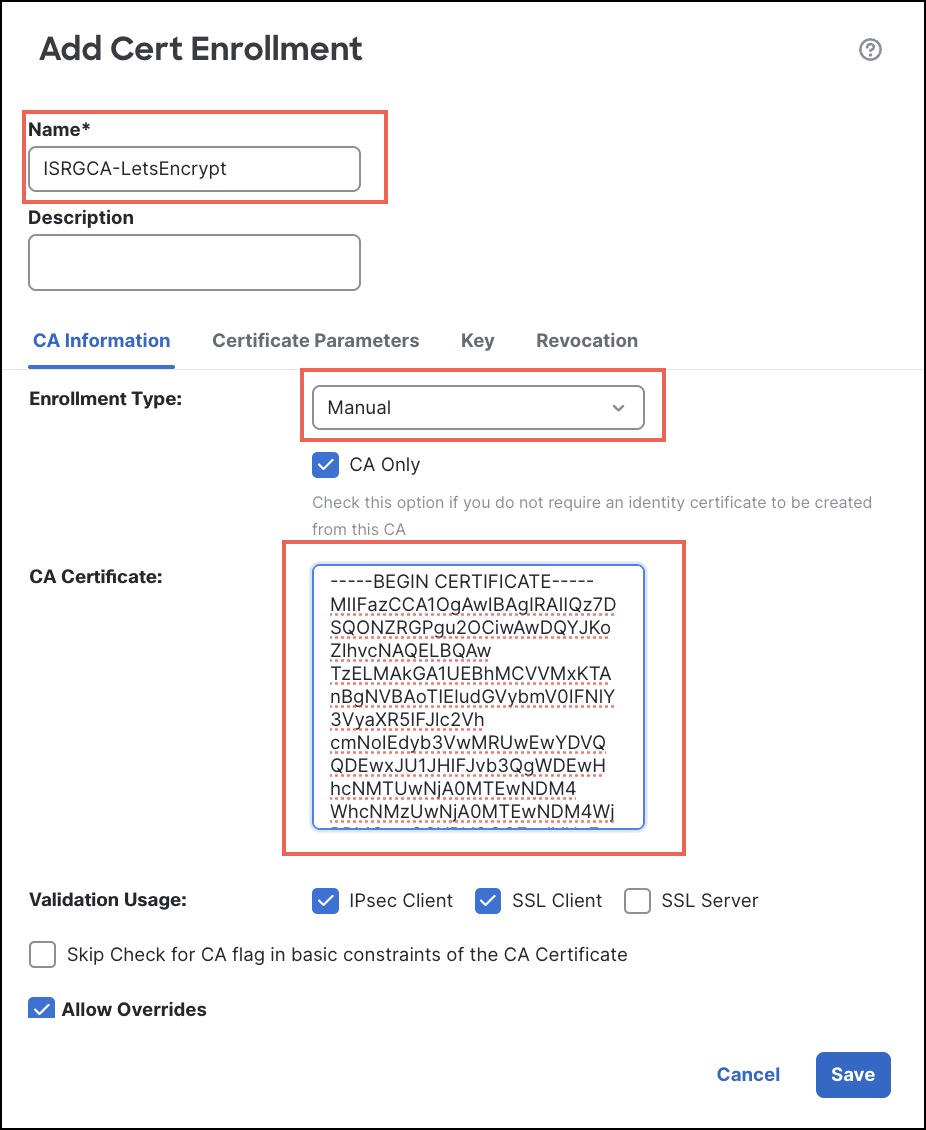
Configure the name and description for the certificate.
-
In the CA Information tab, configure these parameters:
-
From the Enrollment Type drop-down list, choose Manual.
-
Check the CA Only check box.
-
In the CA Certificate text box, paste the manual CA certificate for the ACME server. In our example, we use the root certificate from Let's Encrypt (https://letsencrypt.org/certs/isrgrootx1.pem.txt).
-
Click Save.
NoteThis ACME CA certificate is listed in the Certificate Enrollment page and not under Trusted CAs.
-
-
-
Attach this ACME CA certificate to the device:
-
Choose , and click Add.
-
From the Device drop-down list, choose a Firewall Threat Defense device.
-
From the Cert Enrollment drop-down list, choose the ACME CA certificate.
-
Click Add.
Details of the manual CA certificate 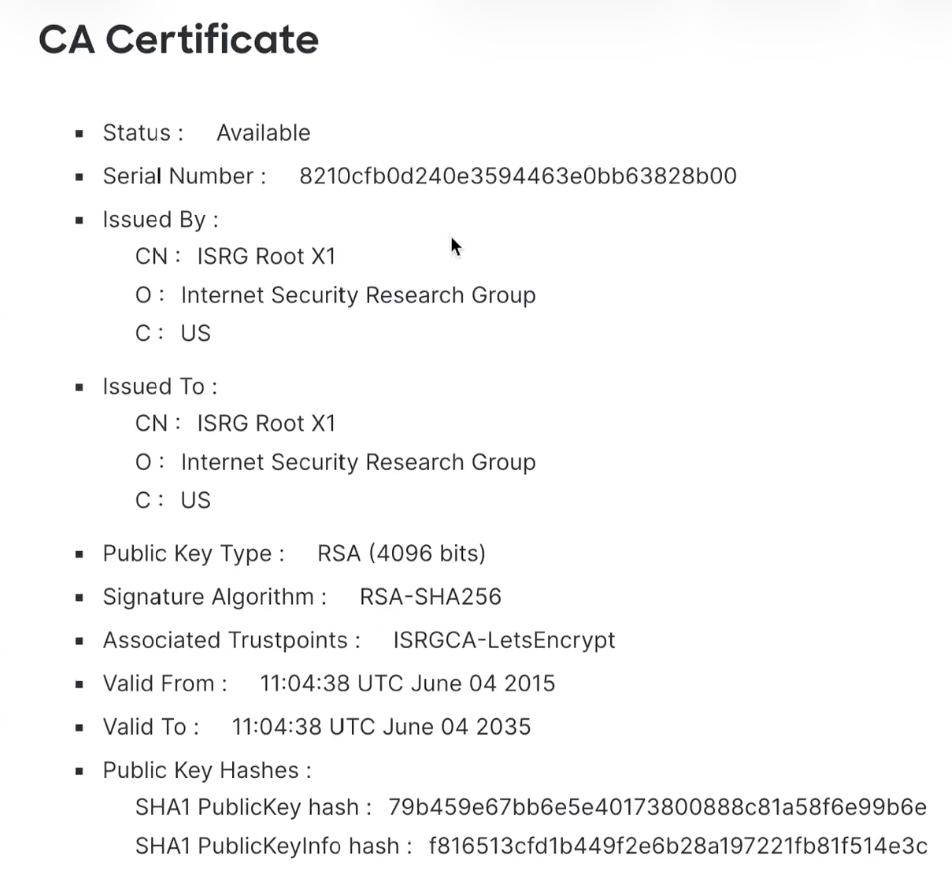
-
-
Prerequisites for ACME server
-
Access to an ACME server such as Let's Encrypt, or any other public or on-prem ACME server.
-
The ACME server must be reachable from the Firewall Threat Defense device.
-
The ACME server must be able to validate the domain name and the alternate FQDNs.
-
If the authentication and source interfaces of the Firewall Threat Defense device differ, ensure that the ACME server is reachable from the source interface of the Firewall Threat Defense device.
-
Authentication interface of the Firewall Threat Defense device is the interface through which the ACME server communicates with the device to verify ownership of the domain.
Source interface of the Firewall Threat Defense device is the interface through which the device interacts with the ACME server to request and receive the enrolled ACME certificate.
-
-
Firewall Threat Defense device does not support ACME wildcard certificates.
Prerequisite for VPN load balancing
-
When configuring an ACME enrollment object for a VPN load balancing group, include both director and member FQDNs in the Alternate FQDN field.